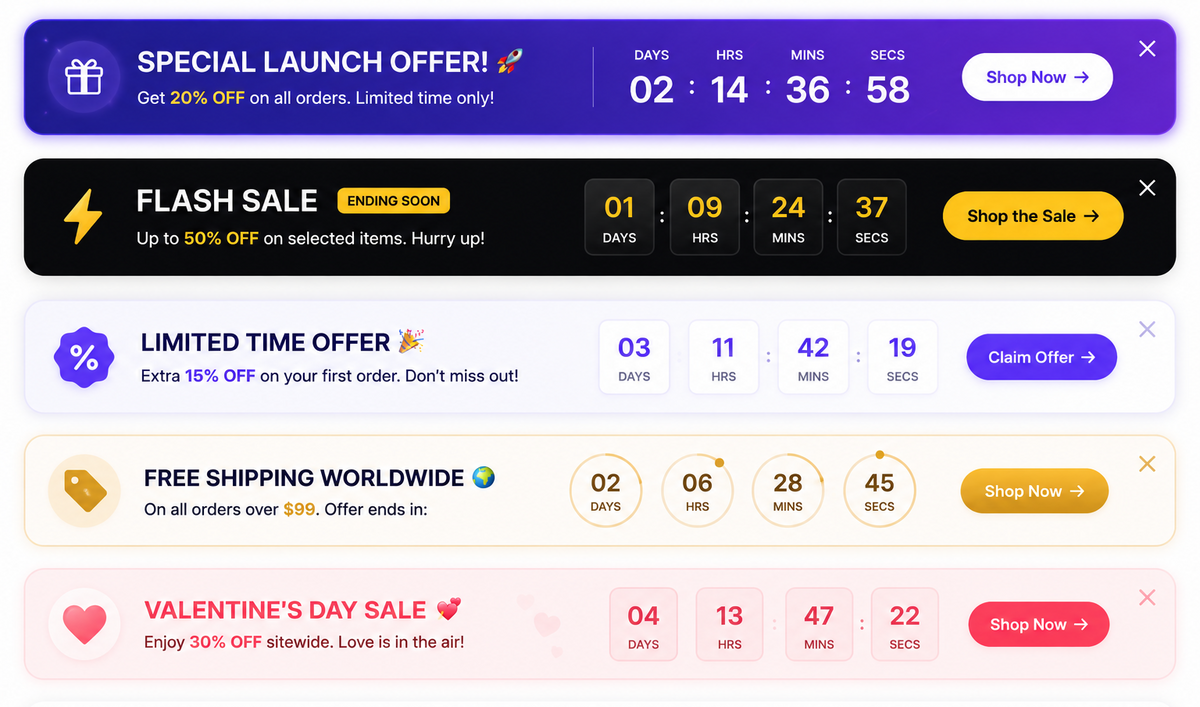
Announcement Bar with Countdown Timer | Shopify Liquid Section for Sales & Promotions
About This Section
Create urgency and boost conversions with our Announcement Bar with Countdown Timer for Shopify. Easily display flash sales, free shipping offers, limited-time discounts, and important announcements with a fully responsive announcement bar.
The built-in countdown timer encourages customers to act quickly, helping increase sales and reduce cart abandonment.
Features
- Live countdown timer
- Fully customizable colors and typography
- Mobile responsive design
- No coding required
- Fast loading and lightweight
- Compatible with Shopify Online Store 2.0
- Works with Dawn and most Shopify themes
Perfect For
- Flash Sales
- Black Friday & Cyber Monday
- Holiday Promotions
- Free Shipping Offers
- Product Launches
- Limited-Time Discounts
What's Included
- Shopify Liquid Section
- Installation Guide
- Lifetime Updates
- Support
Before & After Installing This Section
Drag the slider to see how this section transforms your store's look.
Install in Under 5 Minutes
No coding experience needed. Just follow these simple steps.
Download the section files
After purchase, download the .liquid, .css and .js files from your order confirmation email.
Open your theme code editor
Go to Online Store > Themes > Edit Code in your Shopify admin.
Paste the files into the right folders
Add the .liquid file to Sections, and .css/.js files to Assets.
Add the section in the theme editor
Go to Customize, click Add Section, and select your new section from the list.